
TOP 8 IPTV Players in 2026: Which One Is the Best for You?
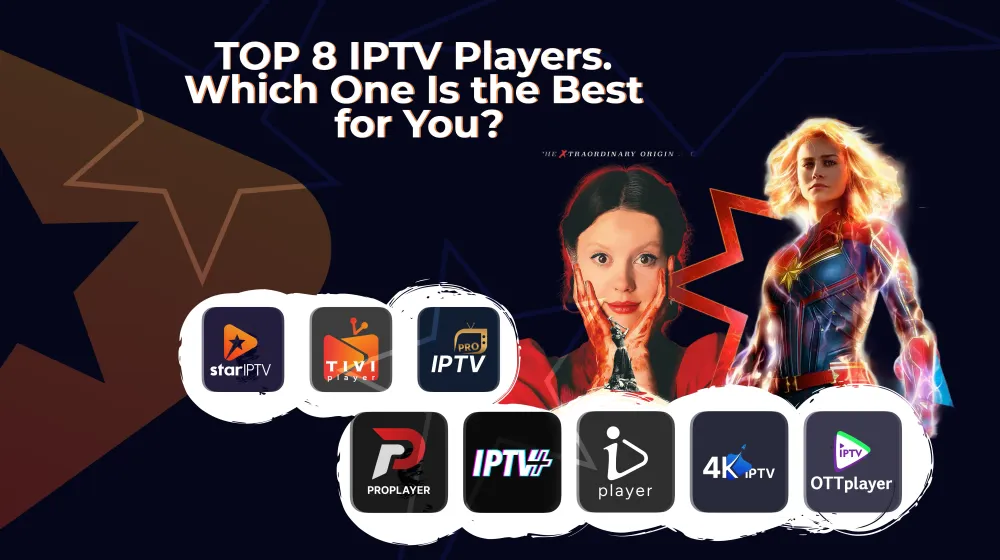
The market is loaded with millions of IPTV applications: similar features, low value, almost identical UI, and playback issues… Can go on the whole day like this, so instead of wasting time, we created a list of the eight best IPTV players you can choose from.
Made it worth your time, enjoy.
What Makes an IPTV Player the Best?
A great IPTV app plays your channels smoothly, supports all standard playlist formats, is easy to navigate, and offers helpful features like EPG, catch-up, and multi-playlist management. All the while, it stays fast, stable, and reliable on any device.
Yes, that's it. Sounds simple and compact, but that's a lot of technical coverage, and manually researching to find exactly these features is tedious.
So, let's start exploring the IPTV players we handpicked for you.
1. IPTV Star
Best for: Advanced IPTV users who want full control, stability, and all essential features.
IPTV Star sits at the top of the list. It delivers all the core features people expect from a strong IPTV player: smooth performance, reliable compatibility, and an intuitive user experience.
Features
Flexible playlist support: IPTV Star works with all standard formats like M3U and Xtream Codes, so it connects easily to most IPTV services and backends.
Cross-device compatibility: It runs on Android phones, TVs, and TV boxes. You can even use it on a PC through Android emulators like LDPlayer.
User-controlled content: There are no built-in channels. Users upload their own playlists, keeping the app fully legal and workflow-friendly.
Essential IPTV tools: The app supports playlist upload by URL or file, Favorites, Search, EPG/VOD (playlist-dependent), and Resume Playback.
Lightweight and reliable: IPTV Star is fast, minimal, and stable - perfect for users who want performance without unnecessary complexity.
2. IPTV Plus
Best for: Sports fans and everyday streamers who want fast navigation and a clean UI.
IPTV Plus focuses on speed and simplicity. It's ideal for users who jump between channels often and want a smooth, responsive interface.
Features
-
Smooth and responsive UI: Categories, channels, and VOD sections load quickly and stay stable even with large playlists.
-
Strong playlist compatibility: Works with M3U and Xtream Codes, making it compatible with almost every IPTV provider.
-
Personalized viewing: Features like Favorites, Watch History, and Resume Playback help users customize their experience.
-
Reliable performance: Optimized for low-resource devices, making it great for older Android boxes and mobile devices.
-
Perfect for daily streaming: Fast loading and simple navigation create a consistent, enjoyable experience.
3. IPTV 4K
Best for: Home cinema users and 4K TV owners who want premium picture quality.
IPTV 4K is built for high-end devices and ultra-smooth playback. It's the top choice for users who stream high-bitrate or 4K content.
Features
-
4K-ready playback: Handles heavy 4K streams with reduced buffering and smooth decoding.
-
Advanced performance: Optimized resource use ensures fast load times and smooth channel switching, even with large EPG data.
-
Premium UI: Designed for modern 4K displays, providing crisp visuals and elegant navigation.
-
Broad playlist support: Works with M3U, M3U8, and Xtream Codes.
-
Ideal for high-end setups: Perfect for users with powerful Android TVs and home theatre systems.
4. PRO Player
Best for: Minimalists and beginners who want a clean, easy-to-use interface.
PRO Player focuses on simplicity and speed. Everything is clean, organized, and easy to understand.
Features
-
Minimalistic UI: The design is clean and distraction-free.
-
Fast navigation: Switching between playlists or categories feels instant.
-
Flexible playlist support: Works with M3U and Xtream Codes.
-
Stable and lightweight: Runs smoothly on lower-end devices thanks to its minimal design.
-
Beginner-friendly: Straightforward controls make it perfect for new IPTV users.
5. TiviPlayer
Best for: Users with large playlists who need strong organization and structure.
TiviPlayer focuses on clean design and efficient playlist management. It's the best option for users working with huge channel lists or multiple providers.
Features
-
Clean and responsive UI: Navigation feels quick and organized.
-
Multiple playlist support: Ideal for viewers using content from several IPTV sources.
-
Category-first design: Live TV, Movies, Series, and Favorites are neatly organized for fast access.
-
Optimized for usability: Fast load times and intuitive controls make it reliable for everyday use.
-
Great for complex setups: Works well for users who value structure and easy navigation.
6. IPTVPlayer.io
Best for: Professionals, testers, resellers, and power users who need multi-device flexibility.
IPTVPlayer.io offers advanced playlist support, a modern UX, and smooth performance across phones, TVs, and desktop emulators.
Features
-
Wide playlist compatibility: Supports M3U, Xtream Codes, M3U8, and JSON formats.
-
Unified cross-device experience: Works seamlessly on Android phones, Android TV, TV boxes, and PCs via emulators.
-
Feature-rich but lightweight: Includes EPG, Watch History, Favorites, and VOD layouts without sacrificing speed.
-
Modern and clear UI: Organized sections make it easy to jump between Live TV, Movies, and Series.
-
Developer-friendly: Perfect for testing, content verification, and IPTV operations.
7. IPTV Simple
Best for: Older users and anyone who wants a basic player with zero complications.
IPTV Simple removes everything unnecessary and focuses on quick, clean playback.
Features
-
Extremely easy to use: Just upload a playlist and start watching.
-
Lightweight: Runs well on older TVs, phones, and low-end boxes.
-
Fast playlist loading: Ideal for large channel lists due to its minimal UI.
-
Stable performance: Avoids heavy animations, ensuring consistent playback.
-
Perfect "just a player" solution: Provides Live TV, EPG (if included), and basic channel navigation.
8. IPTV Pro
(Don't confuse it with Pro Player)
Best for: Users who want premium reliability, advanced controls, and a polished IPTV viewing experience.
IPTV Pro is an upgraded, more capable version of the classic IPTV player model. It adds premium features and improved stability while still keeping the interface simple and approachable for all types of users.
Features
-
Enhanced playback engine: Offers smoother streaming, improved buffering control, and better handling of large playlists.
-
Advanced features unlocked: Supports features like multiple playlists, extended EPG views, and better VOD categorization (playlist-dependent).
-
Ad-free experience: The Pro version typically removes all ads, providing a clean, uninterrupted viewing experience.
-
Customizable options: Gives users more control over player settings, layouts, scaling, and display preferences.
-
Reliable for everyday use: Ideal for viewers who want a stable, premium IPTV player they can rely on long-term.
-
Supports all standard formats: Works with M3U and Xtream Codes, making setup fast and flexible.
A Summary Table: Key Strengths
| Player | Best For | Key Strengths |
|---|---|---|
| IPTV Star | Advanced users & all-round performance | Full feature set, fast UI, stable playback, strong playlist support, wide compatibility |
| IPTV Plus | Sports & everyday streaming | Smooth UI, quick category switching, responsive navigation, great for fast channel changes |
| IPTV 4K (Vision) | Home cinema & 4K TV owners | 4K-optimized playback, premium visuals, smooth high-bitrate performance |
| PRO Player | Beginners & minimalists | Clean interface, easy navigation, lightweight, ideal for non-technical users |
| TiviPlayer | Users with large playlists & multiple providers | Multi-playlist support, structured layout, strong organization |
| IPTVPlayer.io | Professionals, testers, resellers | JSON/M3U/Xtream support, works on all devices, feature-rich but lightweight |
| IPTV Simple | Older users & pure simplicity | Very easy to use, fast loading, minimal UI, reliable on low-end devices |
| IPTV Pro | Users who want premium reliability | Enhanced engine, ad-free experience, more customization, stable on big screens |
15 Safety Tips When Using IPTV Players
The app lists and comparisons will help you choose the right IPTV player. But no matter which app you decide to use, there are a few important safety rules every IPTV user should follow.
Here they are:
1. Use only legal and licensed IPTV playlists
Avoid unknown or suspicious IPTV sources. Always upload playlists from legal providers or your own authorized backend.
2. Never share your playlist or login credentials
M3U URLs often contain usernames, passwords, and server access tokens. Treat them like private passwords.
3. Avoid downloading "modded" or unofficial versions
Stick to official websites or app stores. Modified APKs can include malware or spyware.
4. Check user reviews before installing any IPTV app
Poor ratings can indicate privacy issues, hidden fees, or app instability.
5. Use a VPN only if it's legal in your region
Some countries allow VPN use; others restrict it. Follow your local laws to avoid trouble.
6. Keep your device software updated
Updates improve security, fix bugs, and protect your device from vulnerabilities.
7. Limit app permissions
IPTV players rarely need access to contacts, photos, SMS, or a microphone. Only allow what's necessary.
8. Be careful with free IPTV sources
Free public lists often include unreliable or unsafe streams. They may also redirect to harmful websites.
9. Don't click external ads or unknown links in the app
Some IPTV apps include ads that lead to third-party sites. Avoid clicking anything suspicious.
10. Use parental controls if kids use the app
Many IPTV playlists include adult content. Always activate parental locks where possible.
11. Backup playlists somewhere safe
If your device resets or crashes, you won't lose access to your content.
12. Watch data usage on mobile networks
Live TV can consume several GB per hour. Use Wi-Fi when possible to avoid extra charges.
13. If the app asks for unnecessary payment info, stop
Reputable IPTV players use official in-app purchases, not external payment links.
14. Don't overload your device with too many IPTV apps
Multiple apps running in the background can slow performance and cause crashes.
15. Read the app's privacy policy
Check if the app collects analytics and how it manages your data.
Which IPTV Player Should You Choose?
Eventually, the right choice depends on what you need. Here's a quick guide to help you decide:
1. If you want the best overall experience (features, stability, compatibility)
Choose IPTV Star or IPTVPlayer.io.
Both are flexible, reliable, and work across nearly all Android devices and emulators. They offer strong playlist support and a smooth interface suitable for everyday use.
2. If you want simplicity or you're new to IPTV
Choose PRO Player or IPTV Simple.
They keep everything clean and straightforward. It's a deal for beginners, older users, or anyone who wants a "just play my channels" experience without extra settings.
3. If you want premium quality for big screens, 4K devices, or home cinema setups
Choose IPTV 4K (Vision) or IPTV Pro.
These apps deliver smoother playback, better optimization for high-bitrate streams, and a polished interface that looks great on modern TVs.
There you have it. Any more questions? Check out the FAQs bellow.
Frequently Asked Questions
Resources
How to Use IPTV to Watch Live TV, Sports, Movies, and More in
How to Set Up IPTV on a TV Without a Set-Top Box? A Practical Guide

Content Manager
Anush Sargsyan is a content manager specializing in B2B content about OTT streaming technologies and digital media innovation. She creates informative, engaging content on video delivery, OTT monetization, and modern media technologies. The goal is to help readers easily understand complex ideas. Her writing is the bridge between technical detail and practical insight, making advanced concepts accessible for both industry professionals and general audiences.