
Best IPTV Boxes - 2026 Guide
IPTV boxes are created for a faster, smoother, and more reliable streaming experience. These devices let you install any IPTV player you want, including apps that Smart TVs don't support.
With stronger hardware, better codec support, and more flexibility, an IPTV box is the easiest way to upgrade your TV into a powerful streaming device.
But let's leave the technical parts for the experts; you're here to find the best IPTV box. We'll help you do exactly that.
Let's start from the basics.
What Is an IPTV Box?
An IPTV box is a small device that connects to your TV and lets you stream TV channels and video content over the internet instead of using cable or satellite.
Basically: plug and play.
How Does It Work
Here is the process in 3 simple steps;
Step 1: Get your IPTV box, plug it in, and go to the app store
Step 2: Choose and install an IPTV media player you'd like (e.g., IPTVStar)
Step 3: Once your IPTV media player is installed, load your playlist.
Step 4: Sit back and enjoy, because your IPTV box will handle the rest
So, your IPTV box can decode streams, display them on your TV, provide smooth playback, and support Live TV, VOD, and EPG guides.
But how to choose the correct box?
The next paragraph will help. Read on.
5 Key Factors to Help You Choose The Right IPTV Box
Since we've made it our mission to simplify your search for the right IPTV box, here are some features and functionalities to check before you purchase.
1. Performance: Processor and RAM
A great IPTV box should offer enough power to handle smooth playback, fast navigation, and large playlists without freezing.
To check CPU and RAM, look at the product page on the manufacturer's website or the device's listing on Amazon, Best Buy, or the official spec sheet. These specs are mostly listed under "Technical Details" or "Specifications."
2. Operating System (Android TV, Fire OS, Linux, etc.)
The operating system matters too, because it determines how many apps you can install and whether sideloading is supported.
To verify OS availability, check whether the device runs Android TV, Fire OS, Linux, or tvOS. This info appears at the top of every product page and usually on the box packaging.
3. 4K, HDR, Codec Support (HEVC, VP9, AV1)
You also want strong video capabilities (4K, HDR, and modern codecs), so every stream plays in the highest quality.
To confirm codec support, scroll to the "Video Formats," "Codec Support," or "Playback Capabilities" section of the official device website or search the model name + "codec support."
4. Storage and Connectivity (Ethernet, Wi-Fi 5/6)
Reliable connectivity through Wi-Fi or Ethernet is key for stable live channels.
To check connectivity, look for whether the box supports Wi-Fi 5/6 and includes an Ethernet port; this is listed under "Connectivity," "Networking," or "Ports" in the product specs.
5. App Compatibility and Sideloading Options
Having enough storage ensures apps run without slowdown and updates install correctly.
To check storage, look for internal storage capacity (8GB, 16GB, 32GB, etc.) and whether the box supports SD cards or USB storage (info found under "Storage," "Memory," or "Expansion" in the technical specs).
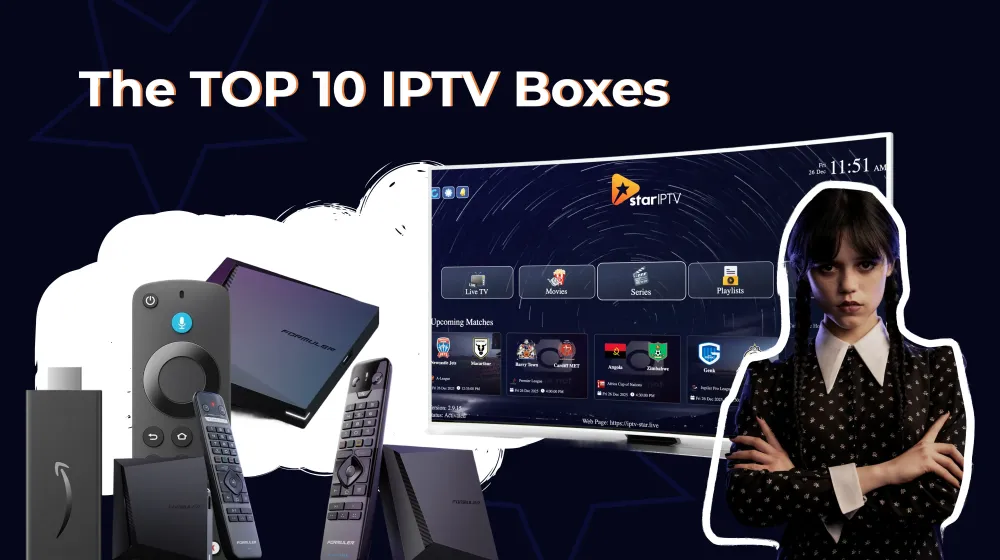
The Best 10 IPTV Boxes to Choose From
If you read this far, you already know the basics that'll help you make a good, informed decision.
And to help you a little more, we made a list of the best IPTV boxes on the market in 2026.
Here they are, explore.
1. NVIDIA Shield TV Pro
NIVIDIA Shield is the most powerful streaming box on the market, known for unmatched performance, AI upscaling, and flawless support for IPTV apps.
It's a top choice for premium users.
2. Amazon Fire TV Stick 4K Max
Next is Fire TV Stick, a fast, affordable streaming stick with strong Wi-Fi, great app support, and smooth 4K HDR playback.
Ideal for IPTV users who rely on sideloading and stable performance.
3. Formuler Z11 Pro Max
Formuler is a high-end IPTV-focused Android box with MyTVOnline3, fast processing, long-term support, and advanced IPTV features designed for heavy users.
4. MAG 540 / 544
MAG is a simple, stable Linux-based IPTV set-top box widely used by ISPs and portal-based systems.
Perfect for users who prioritize reliability over app flexibility.
5. BuzzTV X5 128AI
BuzzTV is a premium Android IPTV box with huge storage (128GB), a strong CPU, and extensive IPTV ecosystem features.
Excellent for users running multiple playlists or apps.
6. Apple TV 4K (2022/2023)
Apple TV has an ultra-smooth UI, a premium design, and exceptional app optimization. Not ideal for sideloading, but perfect for users who want a polished, high-quality experience.
7. Xiaomi Mi Box S (2nd Gen)
Xiaomi Mi Box S is a budget-friendly Android TV box with 4K support, Play Store access, and reliable overall performance.
Great value for IPTV apps.
8. Chromecast With Google TV 4K
Chromecast is a compact streaming device with strong Google ecosystem integration, smooth UI, and full sideloading capabilities.
Perfect for IPTV players.
9. ONN 4K Streaming Box (Walmart)
ONN 4K is one of the cheapest yet surprisingly powerful Android TV boxes. Has excellent sideloading support and performance far above its price point.
10. Ugoos AM6 Plus
Ugoos AM6 Plus is a powerhouse Android box designed for enthusiasts. Offers deep customization, strong performance, and extensive codec support for heavy IPTV usage.
The Best IPTV Boxes: Budget Overview Table
Wouldn't be much of a help if we didn't give you pricing information, so here you have the price ranges for each IPTV box we mentioned:
| IPTV Box | Price Range | Budget Category |
|---|---|---|
| ONN 4K Streaming Box | $20–$30 | Ultra-Budget |
| Amazon Fire TV Stick 4K Max | $40–$60 | Budget |
| Xiaomi Mi Box S 2nd Gen | $45–$70 | Budget |
| Chromecast with Google TV 4K | $50–$70 | Mid-Range |
| MAG 540/544 | $70–$100 | Mid-Range |
| Formuler Z11 Pro Max | $160–$200 | Premium |
| BuzzTV X5 128AI | $160–$190 | Premium |
| Ugoos AM6 Plus | $180–$220 | Premium |
| Apple TV 4K | $120–$160 | Upper Mid-Range |
| NVIDIA Shield TV Pro | $180–$220 | High-End |
Final Summary Table
And to sum everything up, let's add one more comparison table. Here you can find all the important features, compare, and make the best possible choice.
| IPTV Box | OS | 4K/HDR | Storage | RAM | Unique Strength |
|---|---|---|---|---|---|
| Fire TV Stick 4K Max | Fire OS | 4K HDR10+ | 16GB | 2GB | Excellent value + fast performance |
| NVIDIA Shield TV Pro | Android TV | 4K HDR | 16GB | 3GB | Best AI upscaling & streaming performance |
| Formuler Z11 Pro Max | Android | 4K HDR | 32GB | 4GB | Designed for IPTV (MyTVOnline3) |
| MAG 540/544 | Linux | 4K | 8GB | 1GB | Stable for traditional IPTV portals |
| BuzzTV X5 128AI | Android | 4K HDR | 128GB | 4GB | Huge storage + IPTV-focused features |
| Apple TV 4K | tvOS | 4K Dolby Vision | 64–128GB | 4GB | Smoothest UI, best app optimization |
| Xiaomi Mi Box S 2nd Gen | Android TV | 4K HDR | 8GB | 2GB | Affordable & reliable Android TV |
| Chromecast with Google TV 4K | Android TV | 4K HDR | 8GB | 2GB | Great Google integration |
| ONN 4K Streaming Box | Android TV | 4K HDR | 8GB | 2GB | Ultra cheap & smooth |
| Ugoos AM6 Plus | Android | 4K HDR | 32GB | 4GB | Powerhouse for advanced users |
IPTV Boxes vs. IPTV Apps: What's the Difference?
IPTV boxes and IPTV apps both let you watch internet-based TV, but they serve different needs.
An IPTV box is a dedicated device that boosts performance, supports more codecs, and gives you full app flexibility.
An IPTV app, on the other hand, runs directly on your Smart TV, phone, or tablet, making it the simplest and most accessible option. But it can sometimes be limited by the device's hardware and store policies.
Comparison Table
Here are the aspects you should compare if you can't decide between an IPTV box or an IPTV app:
| Aspects | IPTV Boxes | IPTV Apps |
|---|---|---|
| Main Purpose | Dedicated device for high-performance streaming | Software installed on Smart TVs, phones, tablets, or boxes |
| Playback Quality | Excellent (4K/HDR, advanced codecs) | Depends on the device hardware |
| Performance | Fast, stable, handles large playlists | Can lag on older or weak devices |
| App Flexibility | Can install any app + sideload APKs | Limited by Smart TV or OS app store |
| Sideloading Support | Very high | Often restricted (especially Samsung/LG/Apple) |
| Internet Stability | Strong (Ethernet + Wi-Fi 5/6) | Depends on the TV/phone’s connectivity |
| Ease of Use | Requires setup | Easiest: just install and open |
| Best For | Heavy IPTV users, big playlists, premium setups | Casual users, simple streaming needs |
| Average Price | $40–$200+ | Usually free or $5–$25 |
Ready to Make a Final Decision?
At this point, you have learned so much about IPTV boxes that you can design your own. But jokes aside, this guide is meant to help you make a decision that leaves you with no regrets.
Just in case, clarify three more things before you make that purchase.
- Does this box support the IPTV apps or APKs I want to use? _(Some Smart TV stores block apps, while Android/Fire TV allows full sideloading.)
_ - Is the hardware strong enough for my playlist size and preferred video quality (HD, 4K, HDR)? _(Weak processors struggle with large IPTV playlists.)
_ - Does it offer the connectivity I need-Wi-Fi 5/6, Ethernet, or both? _(Your internet connection directly impacts IPTV performance.)
_
Once you confidently answer these questions, go ahead and buy that IPTV box.
One last thing before you go.
If you ended up interested in IPTV apps and do not want to buy a whole box, we have something for you.
Check out IPTVStar, a modern IPTV media player. It's perfect for large playlists, with a simple UI and any advanced feature you could name (powerful EPG, multilingual support, subtitles, and more)
Frequently Asked Questions

Content Manager
Anush Sargsyan is a content manager specializing in B2B content about OTT streaming technologies and digital media innovation. She creates informative, engaging content on video delivery, OTT monetization, and modern media technologies. The goal is to help readers easily understand complex ideas. Her writing is the bridge between technical detail and practical insight, making advanced concepts accessible for both industry professionals and general audiences.